$500 – $2,000
The price wall
That's per video, from a dubbing studio. Quotes come back in days, revisions cost extra, and you find out the voice is wrong after it's already recorded. Fine for a film. Absurd for a channel that publishes weekly.
Windows desktop app · one-time payment
DubForge translates it, dubs it, and burns in the subtitles — the whole pipeline, on your own PC. No credits. No per-minute billing. Nothing uploaded to anybody's cloud.
Instant download · 7-day money-back guarantee · Windows 10/11
Nice to meet you.
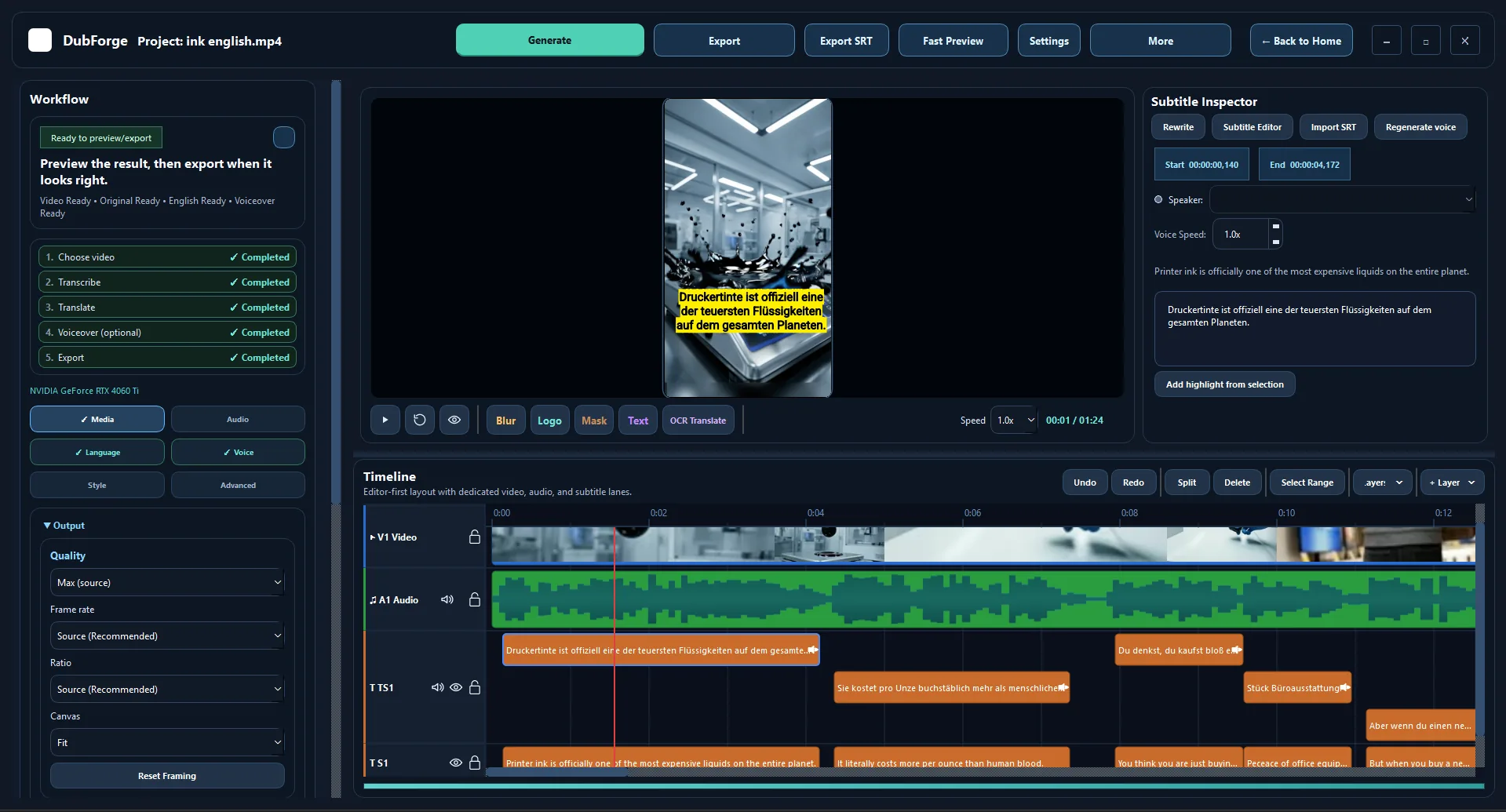
The editor, not a mockup. Timeline, waveform, speaker-coded transcript, burn-in preview.
Sound familiar
You open Analytics and there it is again — a slice of your audience watching from a country whose language you have never published in. Squinting at auto-captions, or getting nothing at all.
So one evening you went looking. A dubbing studio sent a quote and you read it twice. You found a cloud tool, opened its pricing page, and did the arithmetic across your back catalogue. You tried doing one by hand and gave up somewhere around the fourth line that landed a beat late and made the speaker look dubbed.
Then you closed the tab and published in one language, the way you always do.
Nothing about that video changed. Only the price of crossing over did.
Why it never got done
Not one of them is about whether the footage would work in another language. You already know it would.
$500 – $2,000
The price wall
That's per video, from a dubbing studio. Quotes come back in days, revisions cost extra, and you find out the voice is wrong after it's already recorded. Fine for a film. Absurd for a channel that publishes weekly.
$2 – $20 / minute
The meter wall
Plus a monthly subscription on top. Once the meter is running you stop experimenting — you take the first take because the second one costs money. And every second of footage goes up to somebody else's servers to be processed.
4 – 6 hours
The evening wall
Auto-captions into a translator into a free TTS site into your editor. Timing drifts as the video goes on. The voice sounds like a GPS. Fixing one bad line means exporting the whole thing again. You do it once and never again.
All three walls are the same wall: someone else's meter, someone else's server, or your entire evening.
What changes
The way across
Run it end to end and come back to a finished video. Or go stage by stage and check the work in between — the part every one-button tool takes away from you.
STAGE 1
Drop in a video. DubForge builds the waveform and thumbnails once and caches them.
STAGE 2
Faster-Whisper or SenseVoice off the audio — or OCR straight off hardcoded subtitles.
STAGE 3
Your choice of engine, then an AI polish pass that fixes tone and line length for speech.
STAGE 4
Pick a neural voice, set the pace, and let each line be trimmed to fit the original timing.
STAGE 5
Mix, burn in subtitles and layers, render. Fast Preview checks five seconds first.
See it
Original on the left, DubForge output on the right — translated subtitles, dubbed audio, timing held to the original delivery.
Turn the sound on — the point is what it sounds like, not just what it says.
One-time payment · unlimited videos · no per-minute charges, ever
What's inside
Every stage is editable. When the machine gets a line wrong — and it will — you fix that line instead of re-running the whole video.
Transcription
Faster-Whisper for accuracy, SenseVoice for speed. Select the thirty seconds that came out wrong and re-transcribe just that, with the other engine.
Transcription
OCR reads hardcoded, burned-in subtitles straight off the frames. The video you thought was unusable turns out to be a source after all.
Translation
Google Translate works out of the box. Plug in your own OpenAI, Google AI Studio or local Ollama model and the lines start sounding like a person wrote them.
Translation
A polish pass shortens or stretches each line to fit the speaker's actual timing — instead of running over the cut and making the whole video look dubbed.
Voice
145 neural voices in the box. Male and female, several accents per language, per-segment speed. No voice credits, no character quota, nothing to top up.
Voice
DubForge separates the speakers and colour-codes them along the timeline, with a segment count each. A misattributed run of lines gets moved to the right person in one click.
Editor
Blur, logo, mask and text layers with their own timing, positioning, splitting and track locks — sitting on a real timeline, not buried in a settings panel.
Editor
Fast Preview renders a short sample so you catch the wrong font or the clipped line before committing the machine to a full export. Projects save; walk away and come back.
Why a desktop app
This is the whole argument. Everything else on this page is a feature; this is the reason the features are worth owning.
No credits, no per-minute billing, no monthly seat. Render the same clip forty times while you get the voice right — it costs the same as rendering it once, because it costs nothing.
Nothing is uploaded to be processed. For agencies under an NDA, and for anyone handling unreleased material, that is the difference between being able to take the job and not.
The only limit on how many videos you localize is how fast your PC renders. No queue, no fair-use ceiling, no throttling at the end of the month.
The app sits on your hard drive with an offline licence key. It keeps working whether or not this page is still online in two years.
Side by side
Assume a modest workload: four videos a month, ten minutes each. Here's where that lands.
| DubForge | Cloud dubbing tool | Freelancer / studio | |
|---|---|---|---|
| Pricing model | One-time | Monthly + per minute | Per video |
| Videos per month | Unlimited | Capped by plan minutes | Capped by budget |
| Cost to re-render | $0 | Charged again | Revision fee |
| Where footage is processed | Your PC | Their servers | Their studio |
| Edit an individual line | Yes, in the editor | Usually re-run the file | Email and wait |
| Turnaround per video | Minutes | Minutes | Days |
| Works if the vendor shuts down | Yes — it's installed | No | n/a |
| Year one, 48 videos | $47 | $1,400+ | $24,000+ |
Cloud figure assumes a mid-tier plan plus overage at published 2026 per-minute rates; studio figure assumes $500 per video at the low end of quoted market rates. Your numbers will differ — the shape won't.
7-day money-back guarantee. Keep the Quick Start Guide either way.
Built for
You have 200 videos that only exist in one language. Re-publish the best 20 to a second audience without re-shooting anything.
Running the same format across several markets. Localize once per video instead of scripting and voicing each language from scratch.
Take the job, keep the margin. Client footage never leaves your machine, which is what lets you sign the NDA in the first place.
A course is dozens of lessons. Per-minute pricing makes translating one prohibitive; a one-time app makes translating all of them obvious.
TikTok and Reels move fast and burned-in subtitles are the format. Batch through clips without watching a credit balance drain.
Who made this
DubForge is made by one person, not a company.
It grew out of an open-source project that found a real audience — developers picked it up, forked it, and built on it. I make short-form video, a lot of it. The first time I tried to put one of my own videos into another language by hand, it took most of a night and the timing still drifted. I wrote the first version so I'd never have to do that again.
DubForge is what came after. The same engine, taken further and tuned for one job in particular: getting finished video into another language without a studio, a subscription, or an upload. Packaged as a Windows installer that runs without setting up Python, with the speech models already in the box. And rebuilt for an international audience rather than a single language.
That's who it's for — anyone whose video has to work in more than one market. People publishing to YouTube and TikTok across regions. People running product launches or affiliate offers who need the same video to speak to a different audience. The job is the same every time: take the language barrier out of the way, and don't lose a night doing it.
The demo further up this page is real output, not a mock-up. The refund is 7 days, no questions asked. And my name is on it.
— Matt
Included
Not padding. These are the things people actually get stuck on in the first hour.
Included — value $27
Install to first exported video, written for someone who has never opened a video editor. Covers the resource downloads, GPU mode, and the licence terms in plain language.
Included — value $97
Email and Telegram, straight to the person who built it. Not a ticket queue and not a chatbot.
Read this part
We'd rather lose the sale here than have you find out after you've paid.
Still here? Then the rest of this page is for you.
The offer
Launch pricing. The price steps up through launch week and does not come back down.
Most people start here
DubForge Desktop
Instant download · 7-day guarantee
If DubForge doesn't do what this page says it does, email within 7 days and you get your money back. No form to fill in, no "what did you try" interrogation. The one thing we ask is that you actually put a video through it first — if something's broken on your machine, we'd much rather fix it than refund you.
Before you buy
Windows 10 and Windows 11 only. There is no macOS version, no Linux version, and it is not a web app. If you're on a Mac, this is not the product for you and we'd rather say so here than take your money.
The installer is under 700 MB. It's large because the speech recognition, OCR, speaker detection and video engine are all bundled — that's what lets it work without a cloud service behind it.
The heavier optional extras — the largest Whisper model, the GPU acceleration pack — are downloaded from inside the app when you want them, so you only fetch what you actually use.
Partly, and it's worth being precise. Transcription, subtitle editing, layers and export all run fully offline. The neural voices are an online service, so generating a dub needs a connection at that moment.
Your video files never leave your machine either way.
No — DubForge ships in CPU mode and works out of the box on a normal PC. An NVIDIA GPU makes transcription and OCR considerably faster, so long videos finish sooner, but nothing is locked behind one.
It transcribes from a wide range of source languages, including auto-detection, and dubs into the target languages shown cycling at the top of this page — with 145 neural voices spread across them, several accents per language.
The app shows you exactly which voices exist for a language the moment you pick it.
No. One payment, one licence key, no renewal, no card on file, and no usage meter. There is nothing to cancel.
Your key covers two machines — a desktop and a laptop, say. That limit is stated in the licence and not enforced by any phone-home check or hardware lock, because we'd rather not build software that can lock you out of your own tools. We're trusting you to respect it.
Not with this licence. It covers your own content and content you have the rights to edit. If you want to use DubForge for paid client work, email us before you buy and we'll tell you straight whether that's possible.
No. Translation works out of the box. If you already have an OpenAI or Google AI Studio key — or run a local model through Ollama — you can plug it in for noticeably better translation quality. Entirely optional.
You get the download link and your licence key immediately, on the confirmation page and by email. Install, paste the key once, and you're working. If the email is slow to arrive, check spam, then message us.
It's built for spoken-word video: talking heads, interviews, tutorials, voiceover, product videos, short-form. Music, heavy overlapping crosstalk and very noisy field audio are hard for every tool in this category, including this one. There's a vocal separator built in that helps with background music.
Email n.surprise7@gmail.com from the address you bought with, any time within 7 days, and say you'd like a refund. You don't have to justify it. The refund is processed back to your original payment method — that usually lands within a few business days, depending on your bank.
The full terms are on the refund policy page, in plain language.
Email n.surprise7@gmail.com or message t.me/Matt2566. You'll be talking to the person who wrote the software.
Last thing
The videos exist. The audience in the other language exists. The only thing between them has been the cost of crossing over — and that's now a one-time $47 and an afternoon.
Windows 10/11 · instant download · 7-day money-back guarantee
Launch price ends in --d --h --m --s